Hello, will it perhaps soon be possible to display lines in color as well?
So, assigning a color to a line.
I think the further development regarding the code lists is great.
Hello, will it perhaps soon be possible to display lines in color as well?
So, assigning a color to a line.
I think the further development regarding the code lists is great.
Hi @Matze,
Thanks for reaching out and sharing your feature request! It is currently in the works. Although I cannot share any timelines, I have added your +1 and will be sure to update you once theres any news on it.
I see quite a few people asking about this now, myself included and I look forward to seeing this feature myself.
Be great for surveying utilities.
Hi @mggroundworks,
I am glad to hear it! And as mentioned, we are working on it. I will be sure to update the thread so you can try it once it’s out!
Hi @Matze and @mggroundworks ,
Great news! It is now possible to display lines in different colors. With Emlid Flow 14.17 and the latest Emlid Flow 360 update, you can now assign specific colors to different codes. This means that every line and point associated with a particular code will automatically appear in the color you chose for that code, making your data much easier to visualize and organize. Learn more about it here.
Hello Alexandra,
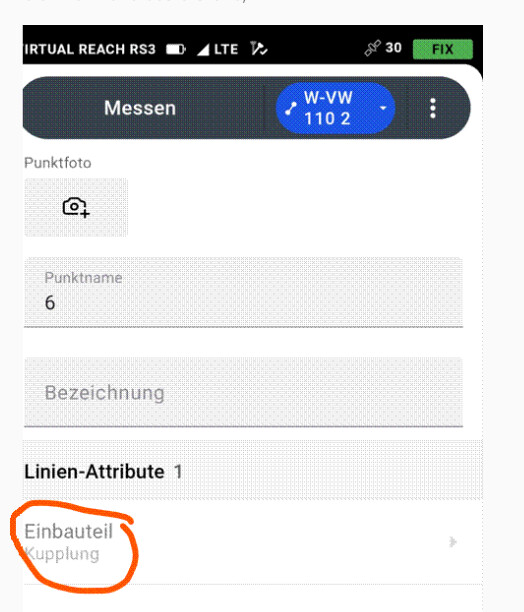
Is there a way to select or enter a new attribute from a “List” for each individual point of a line during attribute collection?
At the moment, the attribute can only be selected once for the entire line. After that, the selection is greyed out and cannot be changed for the following line points.
Is there currently a way to do this, or is such a feature planned?
Thank you in advance!
Best regards,
Hi @Matze,
Currently, what you describe is not possible, as the same attributes (and code) are applied to all the points in the same line. We do have a feature request to allow different codes/attributes for each point on a line, and I’d like to add your +1 to it. To do so, can you please share a bit more about your workflow and how this feature could be useful to it? Do you work, for example, with utility lines where nodes represent different objects?
Hi @Matze,
Thank you very much for the extra info. I’ll mention it to the devs for the design that makes the option selectable in the next step, which would make the feature very intuitive to use.
We are currently collecting feedback for this feature, and wanted to ask just one last question. Can you please let me know which attributes they collect that need to change for each point? If you can share with me a workflow walk-through, that would be super helpful.
Hello Alexandra,
It is primarily about the attribute list. Whenever we survey utility lines as linear features, we encounter a new fitting each time, and we would like to be able to select these as attributes from the list.
This is very important to us.
Thank you very much for your response! I really appreciate it. It has been noted and passed down to the team.
Hello Alexandra,

It’s a shame that in the new version 34.9, the line attribute is still greyed out and cannot be selected for the second point of the line.
Hi Matze,
Thank you for bringing this up. I can see it’s important to your workflow. I have checked with the team, and at the moment there are no plans to implement this functionality. If there are any updates in the future, we’ll be sure to share them in the thread.